
.avif)
.webp)




Infrastructure code rarely stays clean on its own. Teams move fast, and reviews aren’t always deep or consistent. Over time, misconfigurations build up and increase the risk of outages, security gaps, or unpredictable behavior.
Static scanning tools can help, but they often require setup, expertise, and don’t always reflect how infrastructure code is actually used across environments.
Code Optimizer, now in beta, helps teams catch those issues earlier. It scans Infrastructure-as-Code and suggests improvements directly in the Git workflow. Without slowing anyone down, it raises code quality and reduces risk where it matters most.
What is Code Optimizer?
Code Optimizer is a built-in env zero feature that analyzes Infrastructure-as-Code to catch common issues and suggest improvements. It helps teams identify misconfigurations, risky patterns, and inconsistencies that often go unnoticed in fast-moving workflows.
It can highlight things like overly broad access, hardcoded values, weak defaults, missing tags, or copy-pasted code that should really be a module.
By reviewing infrastructure code in context, Code Optimizer helps teams ship cleaner, safer changes without slowing them down.
How it works
Code Optimizer runs directly in your Git workflow.
From your dev environment in env zero, you can trigger a scan on any connected repository.
Screenshot placeholder – Starting a scan from the environment view
env zero analyzes your Infrastructure-as-Code using static analysis tools like TFLint and Checkov, combined with its understanding of your modules, environments, and deployment history.
Once the scan is complete, you’ll see a table of findings. Each finding shows the repository and resource it came from, the severity and type of the issue, a description of the problem, and the recommended fix. You can also review the relevant line of code and which environments might be affected before deciding to resolve, ignore, or investigate further.
The suggested fixes often address things like overly permissive access, hardcoded values, missing tags, outdated module references, or repeated code blocks — with more checks being added over time.
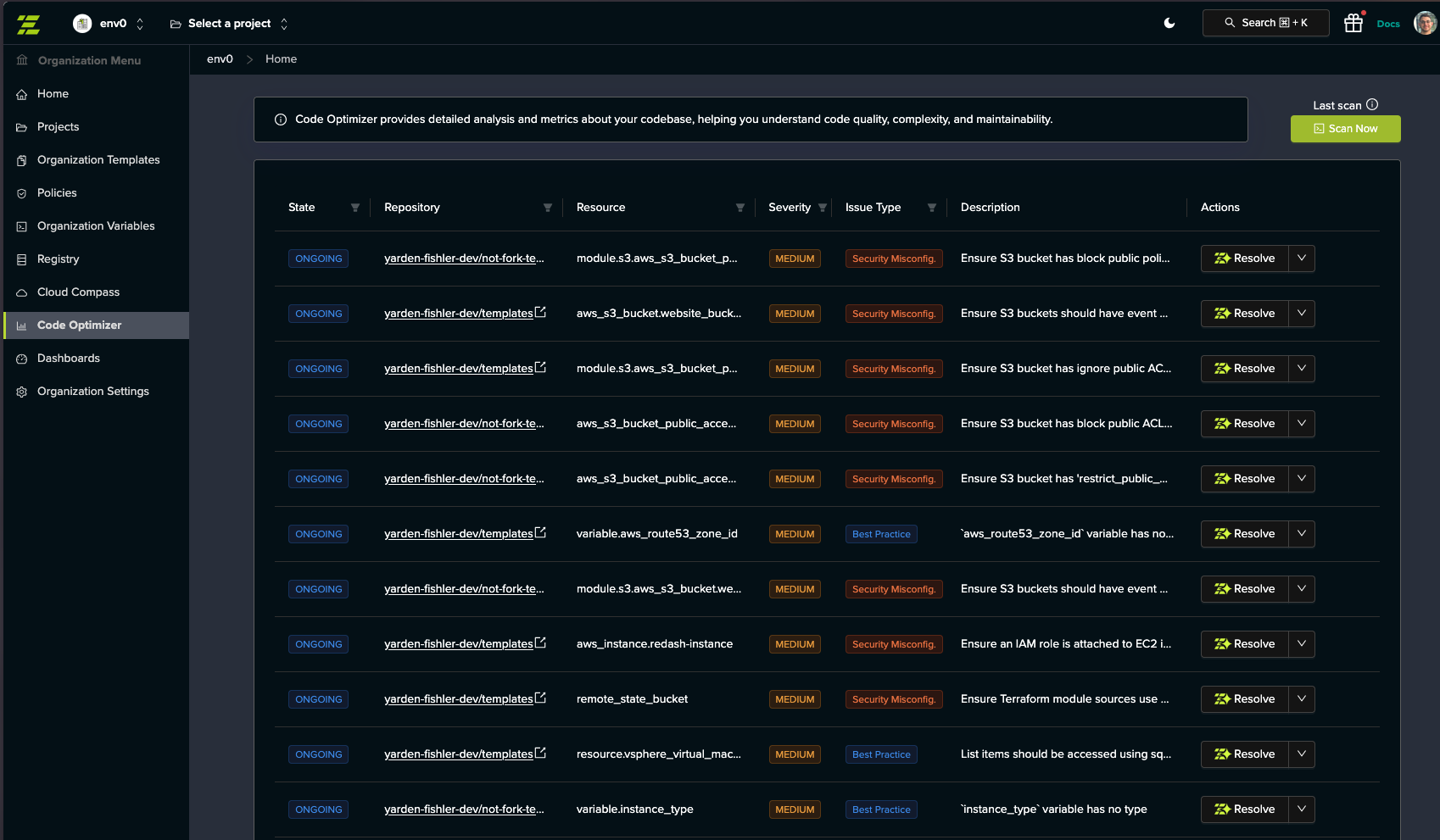
You can view the issue details, see the relevant environment, and either apply the fix manually or open a pull request with the suggested change.
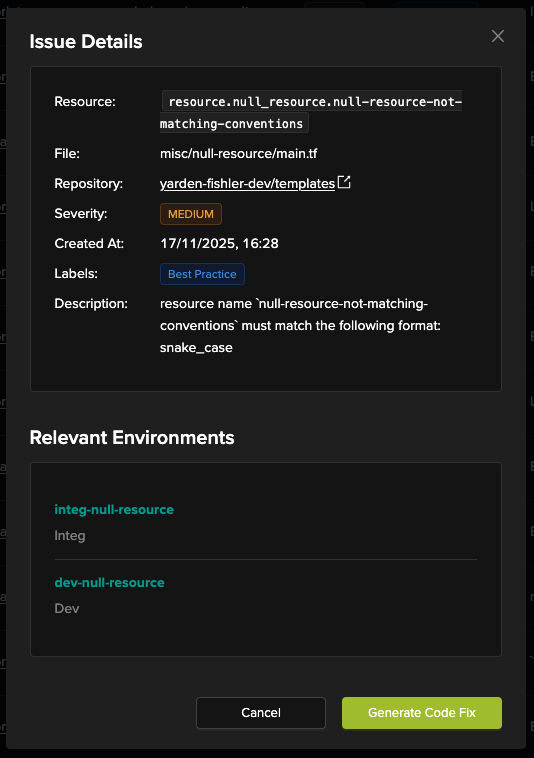
If something doesn’t need to be changed, you can mark it as ignored and continue working.
Why this matters
Infrastructure code quality improves where it matters most — inside the actual development workflow.
Code Optimizer helps teams catch issues early. Instead of relying on post-incident cleanups or periodic audits, you get actionable feedback while the code is still fresh.
It is not a gate or a blocker. It is a way to reduce risk and improve consistency, even in fast-moving or growing teams.
By helping you fix issues like overly permissive access, weak defaults, and inconsistent patterns, Code Optimizer reduces the chance of outages, security gaps, and wasted time down the line.
What you can do today (beta)
- Run scans from development environments
- Detect risky or inconsistent code structures
- See where issues appear and what they impact
- Generate merge-ready code fixes
- Resolve, ignore, or track each issue according to your choice
What’s next
Today, Code Optimizer runs on demand in development environments. That is just the beginning.
Soon, it will support production environments as well, making it easier to catch issues in live infrastructure. We are also expanding the types of checks it performs to cover more edge cases and configuration risks.
In the future, Code Optimizer will grow beyond static code analysis, with planned support for runtime awareness and state validation. This will help teams identify issues that only appear during execution or when infrastructure drifts from the intended code.
Why env zero?
Other analyzers run in CI pipelines or only scan isolated files. They often lack the bigger picture.
env zero understands your infrastructure. It connects directly to your environments, modules, history, and deployment workflows.
That context means Code Optimizer can go beyond static checks. It surfaces meaningful issues, not noise. And it helps you fix them directly in Git, where your workflows already happen.
Try it now
Code Optimizer (beta) is now available in env zero.
You can access it from the left-hand menu in your development environment. Just open Code Optimizer and click Scan Now to get started.
Want a walkthrough? Schedule your technical demo to see how it helps you catch and fix infrastructure issues, right from Git.
FAQ's
What is Code Optimizer and how is it different from traditional IaC scanning tools?
Code Optimizer is an env0 feature designed to analyze Infrastructure-as-Code directly within your development workflow. Unlike traditional scanning tools that run in isolation or require separate setup, Code Optimizer operates in the context of your actual environments, repositories, and deployment history.
Most static analysis tools focus only on code syntax or predefined rules. Code Optimizer goes further by understanding how your infrastructure is structured and used across environments. This allows it to surface more relevant issues rather than overwhelming teams with generic warnings.
The result is a more practical and actionable approach to improving code quality, where issues are identified in context and can be addressed directly within the Git workflow.
What types of issues can Code Optimizer detect?
Code Optimizer is designed to identify a wide range of common Infrastructure-as-Code issues that can lead to security risks, operational instability, or inconsistent deployments. These include overly permissive access controls, hardcoded values, weak default configurations, and missing resource tags.
It also detects structural problems such as duplicated code blocks that should be modularized, outdated module references, and inconsistent patterns across environments. These issues often go unnoticed in fast-moving teams but can create long-term maintenance challenges.
By catching these problems early, Code Optimizer helps teams maintain cleaner, more reliable infrastructure code and reduce the likelihood of incidents caused by misconfigurations.
How does Code Optimizer fit into the development workflow?
Code Optimizer is integrated directly into the Git-based development workflow, allowing teams to scan repositories from within their env0 development environment. This eliminates the need to switch tools or run separate analysis pipelines.
Once a scan is triggered, findings are presented in a structured format, showing the affected resources, severity of issues, and recommended fixes. Developers can review the relevant code, understand the impact across environments, and decide how to proceed.
Fixes can be applied manually or through pull requests, ensuring that improvements are incorporated into the same workflow used for all infrastructure changes. This keeps the process seamless and aligned with existing practices.
Does Code Optimizer block deployments or slow down development?
No, Code Optimizer is designed to support development, not restrict it. It does not act as a gate or enforcement mechanism that blocks deployments. Instead, it provides recommendations that teams can choose to act on based on their priorities and context.
This approach is important for maintaining development velocity. Teams can continue shipping changes while gradually improving code quality, rather than being forced to resolve every issue immediately.
By offering guidance instead of enforcement, Code Optimizer helps teams adopt better practices without introducing friction or disrupting workflows.
What is the future roadmap for Code Optimizer?
Currently, Code Optimizer operates on demand within development environments, focusing on static analysis and actionable recommendations. However, its roadmap extends beyond these initial capabilities.
Future updates will include support for production environments, enabling teams to analyze live infrastructure alongside code. Additional checks will be introduced to cover more complex configurations and edge cases.
Over time, Code Optimizer will evolve to incorporate runtime awareness and state validation. This will allow it to identify issues that only appear during execution or when infrastructure drifts from the intended configuration, providing a more comprehensive approach to infrastructure quality and reliability.

![Using Open Policy Agent (OPA) with Terraform: Tutorial and Examples [2026]](https://cdn.prod.website-files.com/63eb9bf7fa9e2724829607c1/6a4f2974e259132365f900ea_69d6a3bde2ffe415812d9782_post_th.png)